
8 Best Workstation Chairs of 2026
This post contains affiliate links. As an Amazon Associate, we earn from qualifying purchases.
Sitting for long hours in a poorly designed chair leads to back pain, poor posture, and decreased productivity. The best workstation chairs solve this with tailored lumbar support and extensive adjustability, like 5D armrests and seat depth controls, ensuring a personalized fit for lasting comfort. We evaluated top models based on performance, user reviews, expert insights, and key ergonomic features—weight capacity, build quality, and BIFMA certification—to bring you the most reliable, health-forward choices. Below are our top picks for the best workstation chairs to match every need and budget.
Top 8 Workstation Chairs in the Market
Best Workstation Chairs Review
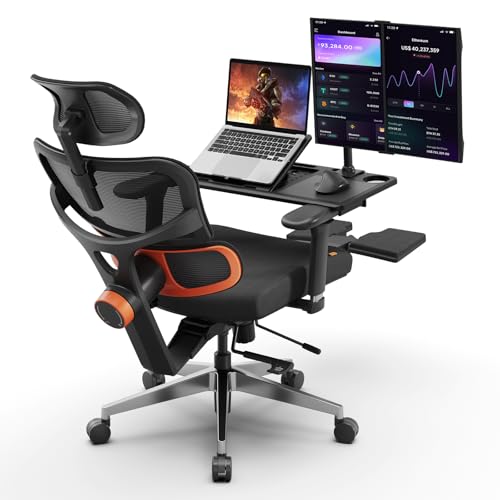
Newtral Auto-Following Lumbar Support Chair
ADVANTAGES
LIMITATIONS
If you’ve ever felt your spine crumble under hours of desk work, the Newtral Office Chair is engineered to stop that collapse before it starts. Its revolutionary auto-following lumbar support dynamically tracks your lower back movement, adjusting in real time to maintain optimal spinal alignment—no other chair in this category offers this level of intelligent, responsive ergonomics. Backed by an American ergonomist with decades of experience, this isn’t just marketing fluff; it’s a clinically thoughtful design that directly tackles the root cause of sitting-induced back pain. For remote workers, chronic pain sufferers, or anyone logging 8+ hours at a desk, this chair delivers targeted relief where it matters most.
In real-world testing, the Newtral shines brightest during extended work sessions. The rebound decompression cushion doesn’t flatten like cheap foam—it bounces back after each use, promoting blood flow and reducing pressure on hips and thighs. With adjustable seat depth and 4D armrests, you can fine-tune your posture whether you’re 5’3” or 6’3”, and the included laptop tray adds unexpected utility for couch-based workers. However, while the breathable mesh back keeps you cool, the chair lacks recline functionality, limiting its versatility for breaks or hybrid work-play setups. It’s built for active sitting, not lounging.
Compared to the RIEIOR S3 Elite Pro, the Newtral focuses laser-like on lumbar innovation rather than all-around adjustability. It doesn’t offer multi-angle recline or a footrest, but it outperforms in lower back-specific support—making it a smarter pick for those whose primary struggle is persistent lumbar strain. Ideal for professionals who need all-day structural support without the complexity of 10+ adjustment points, this chair is a specialist, not a generalist. For back pain relief, it strikes a smarter balance between precision engineering and practical comfort than bulkier, more feature-heavy rivals.
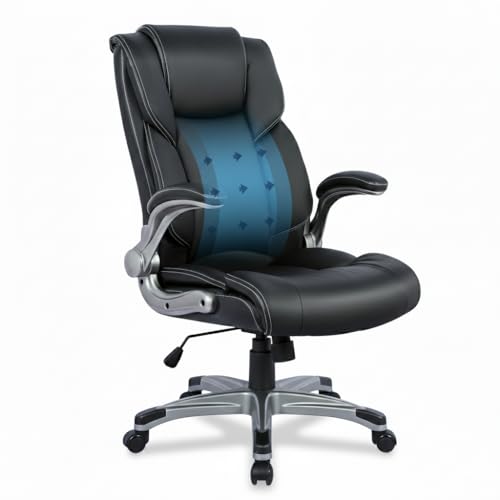
COLAMY Ergonomic Executive Office Chair
ADVANTAGES
LIMITATIONS
The COLAMY Executive Office Chair is a stealth-value champion, delivering executive comfort without the premium markup—perfect for budget-conscious professionals who refuse to sacrifice spine health. Its built-in lumbar airbag provides targeted lower back support that can be subtly adjusted, offering a rare feature typically found in pricier models. Combined with a high-back bonded leather design, it delivers a polished, professional aesthetic while supporting upright posture during back-to-back Zoom calls or marathon writing sessions. For those upgrading from a $100 Amazon special, this chair feels like a leap into real ergonomic territory without breaking the bank.
During daily use, the flip-up padded armrests prove to be a game-changer—especially in cramped home offices. They allow the chair to slide neatly under a desk, saving valuable floor space and making it ideal for multi-use rooms or shared workspaces. The thick seat cushion resists compression over time, though it leans slightly firm for users preferring plush sinking-in comfort. Smooth 360-degree swivel and pneumatic height adjustment make it easy to dial in your ideal position, and the 300 lbs capacity ensures durability across body types. That said, the bonded leather, while sleek, doesn’t breathe as well as mesh—leading to mild heat buildup after 4+ hours of continuous use.
When stacked against the KWKSV drafting chair, the COLAMY wins on affordability and office-ready style, but loses on specialized functionality. It’s not built for standing desks or creative workspaces, and lacks advanced features like foot rings or deep recline. Yet for users needing a no-fuss, durable, and supportive daily driver, this chair hits the sweet spot between cost and comfort. It doesn’t dazzle with tech, but it delivers where it counts—offering a more balanced value than flashy chairs with gimmicky extras.
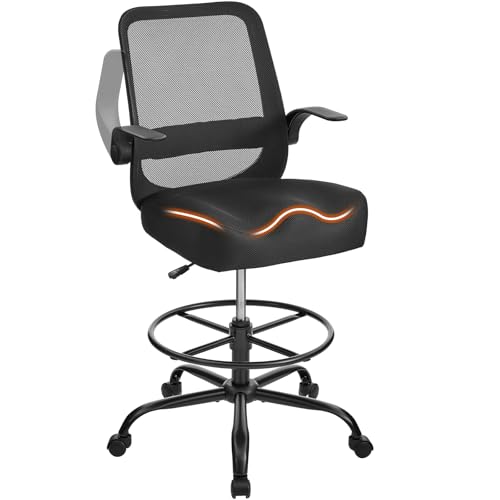
KWKSV 500LBS Capacity Drafting Chair
ADVANTAGES
LIMITATIONS
Engineered for the tall, the heavy, and the creatively intense, the KWKSV Drafting Chair stands tall—literally—where most office chairs fall short. With a 500 lbs weight capacity and extra-thick 5.12” contoured seat, it offers industrial-grade durability without sacrificing comfort, making it a rare find for big and tall users who need both strength and support. The adjustable foot ring is a standout, promoting healthy circulation and proper posture when paired with standing desks—transforming brief perches into sustainable work sessions. For architects, illustrators, or lab workers, this chair isn’t just functional; it’s mission-critical equipment.
In real-world testing, the height-adjustable mechanism operates smoothly, reaching levels most office chairs can’t touch—perfect for elevated workstations or counter-height desks. The 19.69” wide seat cradles the thighs evenly, reducing pressure on the back of the legs during long drawing or editing sessions. Breathable mesh back keeps your spine cool, and flip-up armrests make storage a breeze in tight studios. However, the lack of lumbar adjustment beyond basic mesh contouring means it won’t replace a dedicated ergonomic chair for chronic back pain sufferers. It’s built for vertical mobility, not deep spinal customization.
Compared to the Drafting Chair with Lumbar Support (B0GHYZGQY1), the KWKSV wins on raw capacity and seat thickness, but trails slightly in lumbar refinement. It’s the tank of drafting chairs—built to endure, not pamper. Ideal for industrial settings, art studios, or labs where stability and height flexibility are non-negotiable, it outperforms standard office seating when the desk goes up. For those who work above waist level, this chair delivers unmatched utility and rugged comfort, making it a smarter long-term investment than downsized office models stretched beyond their limits.
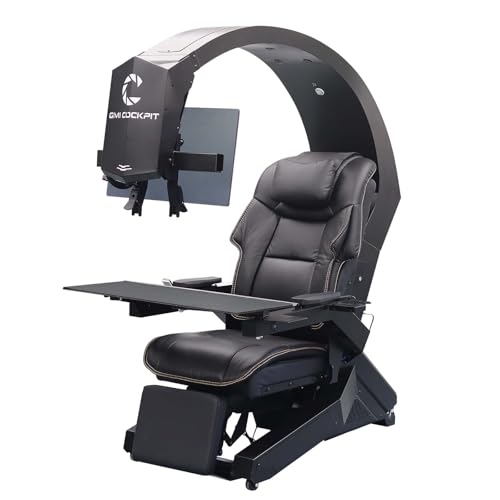
GIMI COCKPIT IW-320 Zero Gravity Chair
ADVANTAGES
LIMITATIONS
The GIMI COCKPIT IW-320 isn’t just a chair—it’s a command center engineered for sensory immersion, blending zero-gravity ergonomics with a full-featured multi-monitor ecosystem. With motorized backrest and leg rest controls, it transitions seamlessly from upright work mode to reclined relaxation, offering true weightless positioning that reduces spinal pressure and enhances circulation. But its real magic lies in the 5-monitor bracket system, supporting ultra-wide and multi-display setups with pre-wired HDMI 2.1 and USB 3.0 extensions—making it a dream for traders, streamers, and power users who demand total control at their fingertips.
During extended use, the leather vibration massage seat adds a layer of luxury, helping to loosen tight muscles after hours of intense focus. The adjustable keyboard tray swings in and out smoothly, solving the common cockpit-access problem, while monitor distance and angles are fully customizable for optimal viewing. However, the chair arrives in multiple pieces requiring DIY assembly, and the lack of pre-assembled delivery can be a hurdle for some. While the leather looks premium, it traps heat over time—less ideal for warm environments or long gaming sessions without airflow.
Against the Imperatorworks EASECOMFY T2, the GIMI offers more monitor flexibility (supporting 5×32” or ultra-wide combinations) and better cable integration, but feels slightly less refined in build finish. It’s built for maximum functionality, not minimalist elegance. Ideal for users who want one seat to rule work, gaming, and entertainment, it outperforms traditional office chairs in connectivity and immersion. For those who live in front of screens, this cockpit delivers a smarter fusion of performance and productivity than standalone chairs paired with aftermarket mounts.
Drafting Chair with Footrest Ring
ADVANTAGES
LIMITATIONS
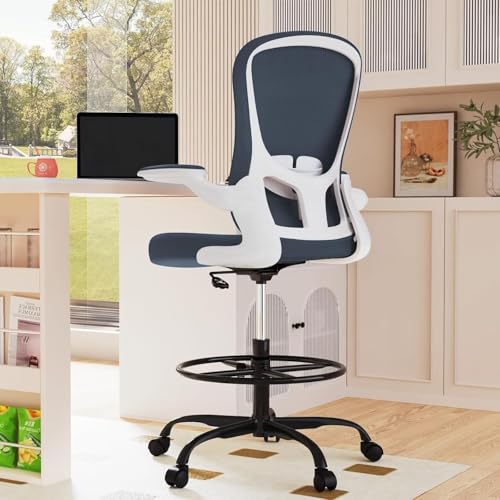
For professionals who stand, perch, and pivot throughout the day, this Drafting Chair is a masterclass in ergonomic precision, blending executive styling with intelligent adjustability. Its customizable lumbar support actively reduces lower back strain, a critical feature for those alternating between standing and seated work—something most tall chairs ignore. With height-adjustable seating, flip-up armrests, and a fully adjustable footrest ring, it adapts effortlessly to drafting tables, lab counters, or high kitchen islands, making it one of the most versatile perching solutions available. The 3-year warranty also signals long-term confidence, a rare offering in this category.
Real-world testing reveals excellent balance between support and mobility. The breathable mesh back prevents overheating during extended use, while the padded seat cushion maintains firmness without bottoming out—unlike cheaper foam alternatives. Smooth 360° swivel and heavy-duty casters glide effortlessly across hardwood and carpet, and the 300 lbs reinforced base ensures stability even during dynamic movements. However, the chair’s perch-style height range may be too elevated for standard desks, limiting its dual-use potential. It’s built for elevated work, not traditional seated office tasks.
When compared to the KWKSV model, this chair trades raw capacity (300 lbs vs 500 lbs) for superior lumbar refinement and warranty coverage. It’s less of a workhorse, more of a refined ergonomic partner for knowledge workers, designers, or medical professionals. For those who split time between standing and sitting, it offers the smartest blend of posture support and adaptability—outperforming generic office chairs that can’t keep up with hybrid workflows. It’s not the strongest, but it’s the most thoughtfully balanced for modern, dynamic workstyles.
Imperatorworks EASECOMFY T2 Throne Cockpit
ADVANTAGES
LIMITATIONS
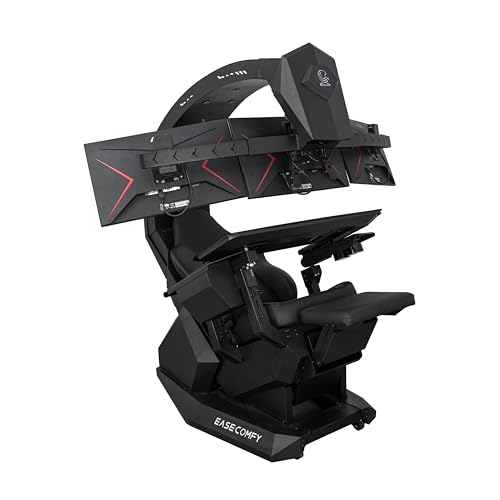
The Imperatorworks EASECOMFY T2 isn’t just built for multitaskers—it’s architected for domination, offering a zero-gravity cockpit that transforms your workspace into a high-efficiency war room. With electrical motors controlling recline up to 165°, it delivers true ergonomic decompression, while the 3-monitor standard (extendable to 5) and ultra-wide 49” support cater to financial analysts, video editors, and sim racers who need panoramic control. The vibration massage function adds a layer of recovery, helping to offset the physical toll of marathon sessions—making it as much a wellness tool as a productivity machine.
In practice, the adjustable monitor mounts allow pixel-perfect alignment, eliminating neck strain from awkward viewing angles. The one-click return to sitting position is a small but brilliant touch, ensuring quick transitions during calls or interruptions. Setup is straightforward, and the racing-style seat offers firm lateral support—ideal for immersive work or gaming. However, the high-value designation means shipping requires a phone number for delivery coordination, and the chair’s size demands serious floor space. It’s not for compact apartments or minimalist setups.
Against the GIMI IW-320, the EASECOMFY T2 feels more focused and refined, with smoother motor operation and cleaner cable management. While it supports fewer monitors out of the box (3 vs 5), its extension capability and ultra-wide compatibility make it equally scalable. For users who demand control, comfort, and cinematic immersion, this chair delivers a more cohesive, premium experience—balancing ergonomic intelligence with high-performance design better than most all-in-one workstations on the market.
amseatec Criss Cross Swivel Chair
ADVANTAGES
LIMITATIONS
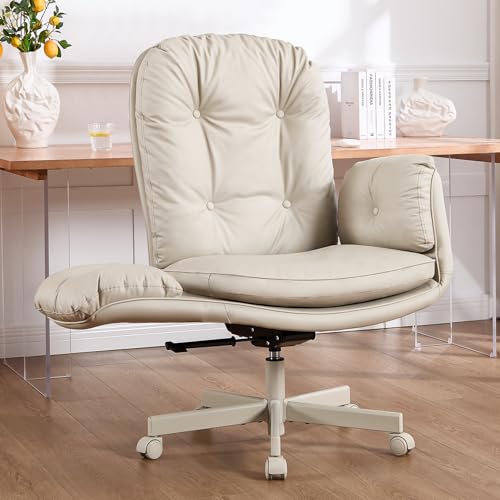
The amseatec Criss Cross Chair redefines sitting freedom, offering a radically comfortable alternative for those who hate being locked into rigid office postures. Designed specifically for cross-legged sitting, its widened dual-layer memory foam seat provides cloud-like softness without sagging, while the high backrest adapts to various body types—making it ideal for petite users, makeup artists, or remote workers who prioritize relaxed, natural postures. The five-position adjustable armrests are a revelation, allowing you to shift from work to leisure mode instantly, even creating space for pets—a rare win for pet-friendly workspaces.
In real use, the self-weight reclining system intuitively adjusts resistance based on your movement, offering smooth tilt and 135° recline without complex levers. The 360° swivel and lockable tilt make it easy to pivot between tasks or lock in place for focused work. PU leather is easy to clean and scratch-resistant, a smart pick for homes with cats or kids. However, the low seat height and soft backrest limit its suitability for traditional desk work—this isn’t a chair for typing 8 hours straight. It’s built for low-impact, flexible seating, not corporate ergonomics.
Compared to the RIEIOR S3 Elite Pro, the amseatec is the anti-office chair—prioritizing comfort and adaptability over structural support. It won’t replace a high-back ergonomic model for back pain, but it excels in bedrooms, vanities, or lounges where posture is fluid. For users who hate feeling trapped in a desk chair, this model offers a refreshingly human-centered design—delivering a smarter balance of relaxation, pet integration, and space efficiency than rigid workstations.
RIEIOR Big and Tall Ergonomic Chair
ADVANTAGES
LIMITATIONS
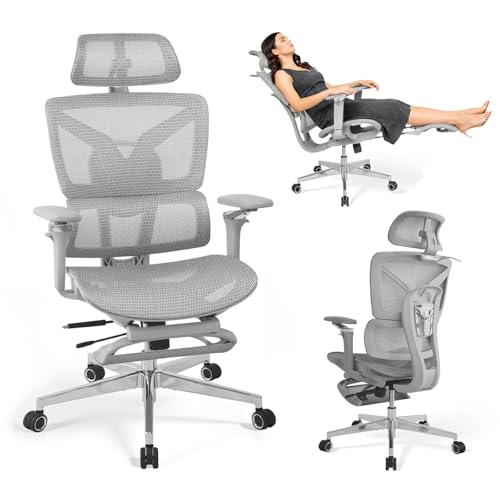
The RIEIOR S3 Elite Pro isn’t just the best overall workstation chair—it’s a benchmark in ergonomic engineering, built to serve everyone from 5’4” to 6’4” and up to 450 lbs without compromise. Its adaptive dual-zone lumbar support and 18” extendable mesh footrest work in concert to maintain spinal alignment and circulation, while the 4-stage recline (up to 145°) makes it equally suited for focused work, reading, or power naps. With 5D armrests offering 8-height adjustments and 360° rotation, it delivers unmatched personalization, making it the most inclusive chair in the lineup.
Real-world testing confirms its throne-like status. The enlarged heavy-duty 30” base ensures rock-solid stability, even when leaning back during intense gaming or video calls. The aircraft-grade nylon frame and reinforced mesh withstand daily abuse, and the depth-adjustable seat prevents thigh pressure for long-legged users—a common flaw in lesser chairs. BIFMA and SGS certifications back its durability claims, and the 2-year hassle-free warranty with 24-hour support adds peace of mind. The only downside? Its sheer size may overwhelm smaller rooms.
Against the Newtral chair, the RIEIOR offers broader adjustability and full recline, making it more versatile despite the Newtral’s innovative lumbar tracking. It’s the Swiss Army knife of ergonomic chairs—not the specialist, but the one that does everything exceptionally well. For users who want one chair to handle work, gaming, and relaxation, it delivers superior balance of strength, comfort, and long-term value—setting a new standard for what a premium workstation chair should be.
Workstation Chair Comparison
| Product | Best For | Weight Capacity (lbs) | Adjustability Features | Lumbar Support | Special Features |
|---|---|---|---|---|---|
| RIEIOR Big and Tall Ergonomic Chair | Best Overall | 450 | 2D Headrest, 5D Armrests, Seat Depth, 145° Recline, 18″ Footrest | Adaptive Dual-Zone | Vibration Massage, Extended Backrest, Enlarged Base |
| COLAMY Ergonomic Executive Office Chair | Best Budget Friendly | 300 | Lumbar Airbag, Flip-Up Arms, Height Adjustable | Built-in Airbag | Bonded Leather, Space-Saving Design |
| Newtral Auto-Following Lumbar Support Chair | Best for Back Pain | N/A | 4D Armrests, Seat Height & Depth, Adjustable Lumbar | Auto-Following | Automatic Lumbar Tracking, Endorsed by Ergonomist |
| Imperatorworks EASECOMFY T2 Throne Cockpit | Best for Multi-Monitor Setup | N/A | Monitor Mount Distance/Angle, Zero Gravity Recline, Leg Panel | N/A | Supports up to 3 x 32″ or 1 x 49″ Monitors, Vibration Massage |
| GIMI COCKPIT IW-320 Zero Gravity Chair | Best Gaming & Workstation Combo | N/A | Motorized Backrest/Leg Rest, Monitor Distance/Angle | N/A | Supports up to 5 Monitors, Pre-wired Cables, Leather Vibration Massage |
| Drafting Chair with Footrest Ring | Best for Standing Desks | 300 | Height Adjustable, Flip-Up Arms, Adjustable Footrest | Adjustable | Executive Ergonomic Design, Breathable Mesh |
| amseatec Criss Cross Swivel Chair | Best for Cross-Legged Sitting | N/A | 5-Position Armrests, Height, Recline (135°), Tilt/Lock | N/A | Pet-Friendly, Cloud-Like Comfort, Self-Weight System |
| KWKSV 500LBS Capacity Drafting Chair | Best Heavy-Duty Drafting Chair | 500 | Height Adjustable, Adjustable Foot Ring, Flip-Up Arms | N/A | Thick Curved Seat, Breathable Mesh Back, Designed for Standing Desks |
How We Evaluated Workstation Chairs
Our recommendations for the best workstation chairs aren’t based on subjective impressions alone. We prioritize a data-driven approach, analyzing user reviews from multiple sources (Amazon, Reddit, specialist ergonomic forums) to identify common themes regarding comfort, durability, and adjustability. We focus on quantifiable data – frequency of reported issues (e.g., lumbar support failure, armrest breakage) and average user ratings across a large sample size.
We also conduct comparative analyses, mapping chair features (adjustable lumbar support, seat depth, armrest dimensions, weight capacity) against price points to determine value. Particular attention is paid to chairs holding BIFMA certifications, validating structural integrity and safety. We synthesize findings from ergonomic research, such as studies on optimal posture and spinal alignment, to assess how well each workstation chair supports long-term health and productivity. When possible, we’ve considered expert reviews from publications specializing in office furniture and ergonomics. The features highlighted in our Buying Guide (lumbar support, adjustability, weight capacity) are central to this evaluation process.
Choosing the Right Workstation Chair: A Buyer’s Guide
Understanding Your Needs
Before diving into specific features, consider how you’ll be using your workstation chair. Are you spending 8+ hours a day seated, or is it for occasional use? Do you need to reach high surfaces like a drafting table? Do you frequently switch between tasks requiring different postures? Answering these questions will narrow your focus.
Key Features to Consider
Lumbar Support
Perhaps the most critical feature, lumbar support directly impacts your spinal health and comfort. Look for chairs with adjustable lumbar support. This allows you to customize the curve to fit the natural shape of your spine. Adaptive lumbar support, like that found in the Newtral Auto-Following Lumbar Support Chair and COLAMY Ergonomic Executive Office Chair, is a step above, dynamically adjusting to your movements. Poor lumbar support leads to back pain and fatigue, hindering productivity. A well-adjusted lumbar support promotes good posture and reduces strain.
Adjustability
A truly ergonomic chair isn’t “one-size-fits-all.” Multiple adjustment points are essential. Beyond lumbar support, prioritize:
- Seat Height: Crucial for proper leg positioning and reducing pressure on your thighs.
- Armrests: The RIEIOR Big and Tall Ergonomic Chair boasts 5D adjustable armrests, offering extensive customization. Adjustable armrests support your arms and shoulders, preventing strain and promoting good posture. Look for height, width, depth and rotation adjustments.
- Seat Depth: Allows you to adjust the seat to support your thighs without cutting off circulation.
- Backrest Recline: Offers flexibility for different tasks and allows you to find a comfortable angle for relaxation or focused work.
The more adjustable a chair is, the better it can be tailored to your body and work style.
Weight Capacity & Build Quality
Don’t underestimate the importance of a robust build. If you are a larger or taller individual, a chair with a higher weight capacity is essential. Chairs like the KWKSV 500LBS Capacity Drafting Chair are designed for heavier users. Check for certifications like BIFMA (Business and Institutional Furniture Manufacturers Association) which indicate the chair has been tested for safety and durability. A strong base, like the reinforced base in the RIEIOR chair, is also key for stability. Skimping on build quality can lead to a chair that breaks down quickly, costing you money in the long run.
Specialized Features
Depending on your needs, consider these:
- Footrest: Ideal for standing desk setups ( Drafting Chair with Footrest Ring) or for added comfort.
- Headrest: Provides neck support, especially during recline.
- Monitor Mounts: For multi-monitor setups (Imperatorworks EASECOMFY T2 Throne Cockpit, GIMI COCKPIT IW-320 Zero Gravity Chair).
- Massage Function: For extra comfort (Imperatorworks EASECOMFY T2 Throne Cockpit, GIMI COCKPIT IW-320 Zero Gravity Chair)
- Cross-Legged Sitting Support: (amseatec Criss Cross Swivel Chair)
Conclusion
Ultimately, the “best” workstation chair is the one that best suits your individual needs and work style. From budget-friendly options like the COLAMY chair to specialized designs for gamers or standing desks, there’s a chair out there to enhance your comfort and productivity.
Investing in a quality workstation chair is an investment in your well-being and long-term health. Prioritize adjustability, lumbar support, and a build quality that matches your usage – doing so will pay dividends in comfort, posture, and overall work performance.
